Wednesday, July 22, 2015

DIY Project

The girls love making crafts. So when my sister sent me a picture of these cool little sun catcher spinney things I knew we had to make them.
These little beauty's are made out of recycled water bottles. Basically you peal off the label and then color them in with sharpie markers. Once they are colored you snip off the bottom and then cut around the bottle in a spiral tell you get to the neck. Then tie a string around the top to hang them. Easy Peasy Lemon Squeeze. Our tree in the back yard is now decorated with them. I'm not sure how long the color will last hanging in the direct sun. But for now they look cool and It was a great rainy day project.

Saturday, July 18, 2015

Loose Teeth

Today my daughter lost a tooth. This is her third loose tooth and the event is still a dramatic one. Her teeth take forever to fall out once they start getting loose. The top front tooth has been loose for months now. She wiggles it but it does no good they just come out when they are good and ready. Today she is blaming it on the sandwich. Yup that's right she lost a tooth in a sandwich a turkey sandwich to be precise.  She is all in a panic about the tooth. Running around the kitchen yelling what do I do what do I do!!!!! Little sister is chanting PULL IT OUT PULL IT OUT ! over and over again at the top of her lungs as I am trying to get her to calm down and let me look at it.  I finally catch her and the offending tooth is just dangling. When I say dangling I mean she can exhale and it flops around. I tried to convince her to let me take it out the rest of the way but she wont budge.  The dentist told her when they get that loose she has until bedtime to yank it herself or mom has to do it. I offered her an extra dollar to let me yank it right now but she is standing firm and wont let me do it. I told her she has 15 minutes to decide then the offer is off the table. If she waits tell bed time and I still have to yank it no dollar. Little sister is currently trying to convince her that the dollar is totally worth it.

What funny tooth stories do you have?

Wednesday, July 15, 2015

Homeschool Buyers Co-op Review


Homeschool Planet Review
 
Are you are in the market for a online homeschool planner/tracking program? I have a great product that I want to share with you. It comes from the Homeschool Buyers Co-op  ~  http://www.homeschoolbuyersco-op.org/ and its called Homeschool Planet. I think this program does everything but the dishes. It is a online program, at the time of this post you can buy either a yearly or monthly subscription. Monthly it goes for $6.95 or you can go for the yearly subscription for $65.00. I received the yearly subscription for this review.  Homeschool Planet offers a truck load of features. Well not really a truck load but it does offer a lot of great features. Hear is a quick over view of what the program does.  First off are the feature for running a house: To Do List and Shopping List that you can text or email. Calendar sharing, widgets to do research or send text messages. There is also a mobile version so you can access things on the go. Then you have the Homeschool Features: Lesson plans, attendance tracking, a planner, a calendar, separate logins for each child to log in view and check off their assignments, a daily digest, email and text message reminders. There is also tracking for attendance, grades, and time spent, and transcripts. You can even print off reports for just about anything you would need a report for while home schooling.
 
Since Homeschool Planet offers so many great features I decided I would talk most about the features that have been most useful for me and the girls.
 
We just started our new school year. I was a little worried about setting up a new school year and learning a new program. It took a month to get the hang of my old program. Turns out I was worried about nothing. Getting started was easy peasy. I signed up for the Homeschool buyers co-op. The Co-op is free to sign up for. Once I had a log in, I then signed up for my copy of Homeschool Planet. I think it took me all of 15min to do. From there I logged into my Homeschool Planet account. You will find some simple to follow tutorial videos under the help button located at the top right of the screen. You click the help button then select online help. It opens a page where you can access how to articles and tutorial videos. I do recommend that you watch the videos. They give you a quick easy to understand way to get set up and going with the program. How ever Homeschool Planet is easy enough to operate that you can figure most of the program out on your own. I had my school year set up in about 20 minutes. You find the school year & vacation set up under the settings button on the top right. It allows you to put in your start and finish dates, vacation days/holidays. From that same screen you can select different tabs. You can set subjects, grading, if you want the program to track time on classes or assignments. You can set if you want Homeschool Planet to share your calendar with google calendar and vice versa. You can input the information about your school like name, location, phone number etc. You can even change the back ground theme of Homeschool Planet. The girls chose a horse them.


Once I had all the general stuff set up subjects vacation days, start and end dates I moved on to adding students. You do this on the left side of the page. There is an add a person button. You can actually add in other people beside students if you plan on them needing the schedule or if you want to have Homeschool Planet email them reports etc. Since its just me and the girls, my page shows Mom, HotRod girl, and Snoopy. You can customize each profile with a cute little picture of the person or what ever you want. You can put in email address and phone number so that they can be sent the digest and reminders by email or text. Neither of my girls have email or cell phones yet so this is a feature we don't use but I like that it is an option for when they get older. You can also select if you wish for attendance to be tracked for each person. We don't use this feature yet, but you can provide each person with an individual login password. The program also allows you to restrict what they have access to and what they are allowed to make changes to.

Under each person you can input the classes and assignments they need to do. It only takes a couple clicks to get it done. You can even list birthdays holidays and appointments, chores etc. for each individual person. We only use the class and assignment features at the moments. I like to pre schedule classes. I click on a time on my calendar select class. From there I can add what class I want them to do. I can set the dates for how long I want the class to run. I can set the grading scale, time spend on the class, I can give it assignments and add resources to those assignments. Once an assignment is entered you can then check off when it has been completed straight from your main calendar. If you have set up grading for each subject you can also give a grade to the assignment from the main calendar or use the grading helper. I have been setting up a weeks worth of assignments on Saturday so that I don't have to enter assignments during the week. All I have to do during the week is open the calendar and mark off if an assignment has been completed. I can also award a grade if necessary. If you set up access for your child they can check off completed assignments them selves. This is something the girls will be doing in the future.

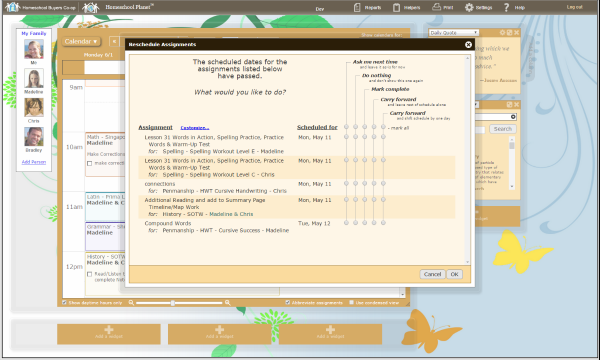
Homeschool Planet ReviewYou can find a grading helper and a rescheduling helper at the top under a tab called helpers. The grading helper is self explanatory it gives you the assignments for the day and allows you to give a grade for each assignment all in one place. I don't use the rescheduling helper much but its fairly simple. When you open it you are given a few choices. You select which one fits best what you need to do. Reschedule an over due assignment, reschedule over due assignment and todays assignments or reschedule assignments by making it a day off. Once you have selected an option it then gives you a quick choice on where you want the assignment to go. From the main calendar you can drag a class to another day if you need to move one class quickly. 

Resources are also a an important part of home schooling. Homeschool Planet offers a resource section. This is where you can input all the resources that you plan to use for the year. You can put them in by workbook, book, website, DVD, Cd, article, file from computer etc. You can also select which subject you would like the resource to be under. The best part is the ISBN lookup feature. You simply select book, workbook, or textbook enter the ISBN number and hit look up. It will then search for the book and enter the known information for you. It saves some time and keeps me from having to enter it all manually.


So far Homeschool Planet is running smoothly. I had one small glitch with internet explorer but technical support was wonderful and got the issue fixed right away. The only thing I feel the program is missing is a reading log. My girls read a lot of library books for free reading. I need to keep track of these books. How ever I do not want to have to enter them each as an assignment and resource. I prefer my resources to just list the curriculum books and websites that we are using for our core classes. It would be great to have a designated reading list where the girls could enter the book ( ISBN lookup would be great) and then list how much time they spent on the book.

I am very happy with Homeschool Planet and its ease of use. I hope you will click the link below and see what other Crew members are saying about Homeschool Planet. I also wanted to mention that Homeschool Planet offers a free 30 day trial and no credit card is required so give it a try. http://www.homeschoolbuyersco-op.org/ 


Social Media:Facebook: https://www.facebook.com/homeschoolbuyers
Twitter: https://twitter.com/hsbuyerscoop
Google+: https://plus.google.com/112069021534542740249/about


Homeschool Planet Review

Crew Disclaimer

Thursday, July 2, 2015

Tuesday, June 23, 2015

Moisturizing anti-aging facial mist

I have never shared one of my beauty product recipes before and today seemed like a good day to share this one. With summer here I have transitioned from my winter moisturizer to something much lighter. This is a toning blend that contains a few essential oils that I choose for there anti-aging properties.

I use a 2oz glass cobalt bottle with a spray top to blend everything in.

You need
4 drops Frankincence essential oil
4 drops Calendula essential oil
2 drops Roesmary essential oil
4 drops Rose hip oil essential oil
Witch Hazel
Distilled water

I like to put my oils in the bottle first then I fill the bottle 3/4 full with witch hazel and then add distilled water to fill it the rest of the way to the neck. Shake the bottle well before spritzing your face. I apply in the evening and morning after washing my face. One or two sprays does my hole face. Allow to dry before applying your makeup. It adds plenty of moisture to my skin with out having a heavy feeling. I hope everyone enjoys the blend.

SmartKidz Media Library for Homeschoolers Review

SmartKidz Media Review


SmartKidz Media Library for Homeschoolers is a digital media resource library that is cram jammed full of learning videos. It is produced by SmartKidz Media  ~http://www.smartkidzhomeschool.com/. SmartKidz Media has basically compiled a bunch of educational videos all in one easy to access place. The library contains videos for a wide range of subjects. Including history, science, health and fitness, lifestyle and cuisine, travel and adventure, art, music etc. There is also a baby signs program, Quick study guides, a good ammount of Ebooks, and a fun zone that contains games puzzles and riddles. This is a subscription program and at the time of this review a one year subscription goes for $99.00.  The site does not have any out side ads or links. So its safer for kids to use. Although I still recommend supervision when kids are doing anything online.

The girls have been watching video lessons on SmartKidz for several weeks now. We have been getting a lot of rain lately. So these have been our rainy day go to videos. The videos are of good quality and play nicely from both our laptop and the Ipad. The videos keep the girls interest and they usually ask to watch more than one.

The world of discovery section has been the girls favorite so far. Specifically the animals and wild life collections. These videos give such great information about so many different plants and animals. We have actually seen quite a few of them already.  They have often spotted an insect or animal when we are out hiking or biking and have to look and see if we can find a SmartKidz Media video on it.  


I discovered that SmartKidz Media has some health and fitness videos. These give the girls a little something different to do for PE class. We do a lot of out door PE type activities. But when the temperature hits 100 its just to hot be out side for long. We have given a few of the health and fitness kids videos a try. The girls liked the aerobics and exercises for kids video the best. I found the music a little annoying but the girls loved it and really got into the movements the video was asking them to perform. So I let them do it when ever we cant get out side. I think these videos are a great way to get kids moving. The health and fitness section also has some videos for adults. Like pilates, and bodyforming. I tried out the pilates video it seemed a little to easy for me but I am circuit training kind of girl, so I am used to fast passed and heaver weights. It was still a good video and my mom enjoyed it the day she decided to join me for a work out.


I do not allow the girls to play video games but I do make the acceptation for the occasional educational game. I decided to use the fun zone as a reward for a job well done on another assignment. I allow the girls a limited amount of time in this area. We set a timer on the desk so they would know when their time was up. They tried out several activities in the Fun Zone, and the girls really enjoyed the find the hidden treasure game. They are big fans of the I spy type books and games and this is a lot like that. Across the top they will find the outline of some objects then they have to look through the picture to see if they can find the items. The girls usually work on this together as more of a team work activity. They like to try and find all the items before the timer runs out. They also think the monkey that giggles when you select the wrong treasure is the funniest thing ever.


In case you are wondering SmartKidz Media will be expanding
the medial library in the near future. We love all things history in our house. We are most excited to see that history videos will be added.  I often use videos as a supplemental for our regular curriculum. The girls read about it in our books, then if they can see a video it helps to cement the information in. The videos just make some things a little more exciting. I cant wait to see what videos will be added next. I am trying my best to use patience while I wait for them to be released.


Please click the banner below to see what other crew members are saying about SmartKidz Media.
 
Social Media:Facebook: https://www.facebook.com/smartkidzhomeschool
Twitter: https://twitter.com/smartkidzmedia

SmartKidz Media Review


Crew Disclaimer

Thursday, June 18, 2015

Garden success!

I am a new gardener last year was my first real garden. Me and girls gave it our best but it just did not produce much. So this year I decided I was going to figure out what went wrong and fix it. My goal is to increase the size of our garden so that it can provide all the fresh produce we need during the summer and may be even some to put back for winter.  I decided to test the soil and see if may be that was the problem. I bought one of those little test kits at Walmart. Me and the girls followed the instructions exactly and every tube was just about clear. No hint of color at all. I though ok the test kit is a dud. So I went back to a different Walmart and bought two more from different sections of the store. We tested the soil again using soil from different parts of the bed. Guess what no color again. We have DEAD DIRT! yup that's right my soil had basically little to no nutrients in it. No wonder why out garden didn't produce much last year.

So I made a trip to the local home improvement store and bought 4 50lb bags of cow manure. I put two bags in each bed. We waited three weeks and tested the soil again this time we got very faint colors. We still needed more this time my brother in law brought me some fertilizer and I basically dumped a bunch in each of the beds. Waited three weeks and tested the soil again this time I had color in the ok range all across the board. Me and the girls set about planting seeds as soon as the last frost had passed. We planted spaghetti squash, pickling cucumbers, green beans, peas, lettuce, purple cabbage, white radishes.  We are now a few months into this growing season and our plants are starting to produce actual produce something. We have 5 squashes that are happily growing on vines that stretch out of the beds and across the lawn. The cucumbers are taller than the trellis me and the girls built for them. We have already gotten more green beans than we did all summer last year. The lettuce is growing on straw bails and so far it has done well enough that we haven't had to buy any from the store, and we are eating salad every night. Since I appear to have garden success I thought I would share a couple photos of my crazy squash plants. The vines are about twice as long as in this photo as it was taken over a week a go and they have really taken off with the rain we have had the last three days. There are now 5 vines that trail out each side of the bed and run along the ground about 4 foot.


Tuesday, June 16, 2015

CTC Math Review

CTCMath Review
 
Today I bring you CTC Math, this is a great math program that my kids have absolutely loved. You can check it out here http://www.CTCMath.com. We received the12 Month Family Plan for homeschoolers there is a special discount for homeschool families. At the time of writing this review the home school family plan is 2 or more children and is $118.80 for a 12 month subscription. Which gives you access to all grades from kindergarten through trigonometry. You can move between grades if your child needs to. It has 1,367 animated and narrated lessons that you can fast forward, rewind, and play as many times as you want. It includes test and 57,000 interactive questions. The CTC Math also offers instant feedback for both the student and the parent. The girls love that they can see how they have done right away. CTC Math is a full curriculum for grades K-6 and is recommended as a supplement for grades above 6th. I wanted to address the common core issue real quick since so many are asking. CTC Math is not common core aligned they teach math the traditional way.  It will also run on all modern HTML5 platform including Ipads and windows operated computers.
 
Each of the girls have their own log in. They log in and select the grade level that they need and then choose the days lessons from there. Both of the girls have been using CTC Math to review and brush up on any gaps that may have occurred this year. We will begin using it as our full time curriculum in a few weeks. For now I have given them each a list of areas that they need to work on. They are free to select from that list what they want to work on for the day or week. HotRod Princess has been working on the division and multiplication sections the most. Math is not her favorite subject and I have yet to hear one single grumble about doing a lesson for the day. The narrated lessons are so easy for her to understand. I love that it teaches using the traditional method. Division was something we had just began to touch on in our previous curriculum. It was clear that it was not clicking for her. I had her log in to CTC Math and find the first narrated lesson for division. I came back a little while later and she was already working on the interactive questions. I had her explain to me what she was doing and why. She was getting it, actually getting it after just one lesson. She admitted she had to watch it twice and said she did rewind it and listen to parts of it again. She proceeded through the rest of the lessons and interactive questions over the next two weeks. I had her take the comprehensive test instead of the standard test and she scored a 89%. 
 
Snoopy girl is just cruising along with CTC Math.  It has now become her program of choice. She actually ask to use it most days. We are at the end of kindergarten, and I felt she was a little behind in money counting.  I want them both to be able to count money and make change easily. So we used the money section as our jumping off point. The explanations have worked very well for her. They are simple down to earth lessons with out a lot of fluff. The girls both appreciate that it gets right to the point of the lesson. I was glad to see that it covers coins like 50 cent pieces and 1$ coins. We don't come across these types of cons very often any more. But I want the girls to be able to recognize them and know the value of them. I also love how realistic the coins and bills look. It makes it much easier to recognize them in real life.
 
Every homeschool mom loves a good report.  This is my favorite parent feature of the program. This makes some of my day so much easier. I can get an up-to-date look at everything they are doing that week and how they have scored on it. I can print it all out and store it in their portfolios.  Every lesson they do is logged and given a score it even logs what date and how many attempts they did. The reports can also be sent directly to your email account.  
As the kids improve and complete different levels of the program they are given awards. The awards are fully printable and the girls love hanging them on the wall. Another great feature that I consider a report of sorts. Is the ability to print the questions they have answered for the lesson. I can have them print off the questions they have finished for review or just to keep in their portfolio. 


 My next favorite feature is the speed skills game. This is an added bonus to an already great program. Your child can access it from the bottom of the home page. It has 4 levels and under each level you can select a set of skills to work on. My girls are working on memorizing math facts so this has been perfect. I never had to memorize these as a child and I wanted the girls to get a better start at math than I had. They have been playing this game using the level 1 over the last few weeks. They are now in competition with each other, to see who can get the most correct the quickest. It has become so much fun for them they are actually asking to practice it.


We are in love with CTC Math and I am excited to add it our list of curriculum for then new year. Be sure to click the banner below and read what other crew members are saying about CTC Math.
 
Social Media:Facebook: https://www.facebook.com/ctcmath
 
CTCmath Review
 
 
Crew Disclaimer

Saturday, June 13, 2015

Dynamic Literacy-WordBuildOnline Review


JazzEdge  Review


Both of my girls are good readers, they both read above grade level. How ever I am always looking for a ways to improve reading comprehension and build vocabulary. We have been working with Dynamic Literacy using their WordBuildOnline program.

The program is designed to work in 10-15 minutes a day. If you do one activity a day the program should last you a full school year. Of course you can do more lessons a day if you have a child trying to catch up or just a speedy worker. The program is designed to improve reading comprehension, using morphology. Which is where you study the meanings of the individual parts of the word such as the roots, prefixes, and suffixes. After each unit your child's progress is measured and the program difficulty is adjusted either forwards or backwards depending on their needs. 

Several levels are available: Foundations Level 1 generally for students 2nd 3rd or 4th grade this is the level we are using and the level that I will be sharing about in this review.  They also have foundations level 2, Elements levels 1 and 2 is for 6th to 10th grades.  Each level is $30 per student and your child gets to use it tell they have completed the level even if it takes more than a school year.

The parent account has some useful features. It gives you the ability to manage students and groups, notifications, edit profile and view videos.  I use the notification feature as a simple way to keep track of what she has completed for the day. Then I can log into my parent account later to see how she did. The parent account also allows you to access a progress report for each student. Inside the progress report it tells you what level your student is working on. If they have moved up a level or down. It also gives a date, time, what the activity was that they worked on and if it was completed and how long they spend on it. You can also reset the activity data if you feel the need to. I used this feature the other day when I tried out one of the activities my self.
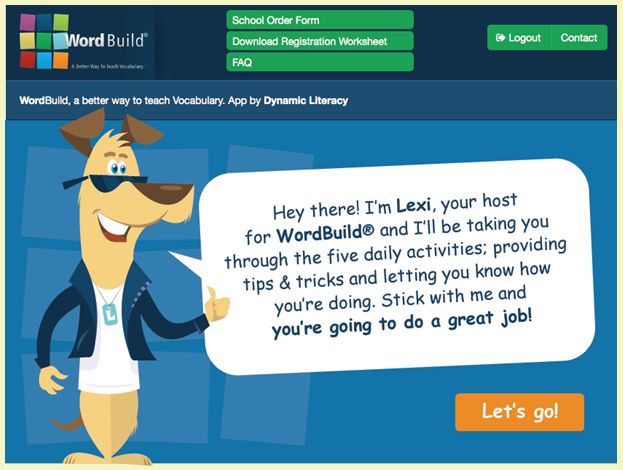
JazzEdge  ReviewWe are using Foundations Level 1 for my soon to be 3rd grader.  Every student is given their own log in. Once they log in it takes them to a main dashboard. The dash board has several things. First smack in the middle is the daily assignment with a big Lets GO! button that you click to start the activities for the day. There is also a score board that shows how they did for the day. Below that if you scroll down a little you will find How To Videos. I do recommend you have your child watch these. They really help in knowing how to perform each activity that they will be given each day. The videos are easy to understand and the girls understood them quickly. Down below the how to videos are the Wordbuild Videos. Your child NEEDS to watch these.  I do wish they would automatically play at the beginning of the days activity. The Hotrod princess tends to forget that she needs to go look at it before beginning the activity for the day. The Wordbuild Videos tell you what the prefix, roots and suffixes mean, as well as where they come from. So they are very important to watch. I encourage Hotrod Princess to view it more than once before beginning the activity.

We have been using the program every other day so that I can blend it in with her other reading work. So far she has a love hate relationship with the program. She loves how quick they are to do. The child hates any assignment that takes more than 15min of sitting still. How ever she is struggling with a few of lessons. Mainly the Magic square activity.  For some reason no matter what prefix or suffix is being used this activity is difficult for her.  She is getting better at it but I think it will take some time.

At the end of each unit the student will take an assessment this is a great evaluation tool. Hotrod Princess has already taken one of these assessments. She is showing improvement in her ability to figure out the meaning of words. I have noticed that when she read she is starting to use the roots, prefixes, and suffixes to help her figure out the meaning of the word.

I know she will continue to improve the more she practices with the program. I have been encouraging her to keep trying, and to watch the Wordbuild videos again before doing the activities for the day. Check out the link below, to see what other Crew Members are saying about WordBuildOnline and the other Dynamic Literacy products.

Social Media:Facebook: https://www.facebook.com/pages/Dynamic-Literacy/77106927761?ref=hl     
Twitter: https://twitter.com/dynamicliteracy       
Pinterest: https://www.pinterest.com/dynamicliteracy/

Dynamic Literacy Review
 

Crew Disclaimer

Wednesday, June 10, 2015

Grandma's Hands

I lost my grandma earlier this year and today I was going through some photographs. I came across this photo-shoot that I did with my grandma and my two girls. The tattered Bible belonged to my grandpa and his dad before him and now it holds a place on my shelf and will one day be passed down to the girls. These have turned out to be some of my favorite photographs. Their hands tell a story, of the past and of the generation to come.


Wednesday, June 3, 2015

Movie Night at the drive in


We frequent the local drive in in the summer. For those of you that don't know what a drive in is, its basically an out door movie theater where you sit in your car or in lawn chairs and watch a movie. There are not many left here in the good ol USA. It saddens me every time I see one close down. I hope ours never closes. Most Friday or Saturday nights this is where you will find the families of our small little town. It is a great family event and we go most weekends in the summer when they are open. Families spread out in lawn chairs and blankets. Kids get together for a game of catch or touch foot ball. The little ones hit the swings and we get the chance to talk with friends family and neighbors. Family nights like these are just one of the things I love about this small town.
 This time we brought a cute little cousin with us. We call her bug though I have no idea how that ended up as her nick name. So we loaded up the car stopped for some snacks and hit the road. Its a whopping 16 minutes from our house. On the way we the Lord blessed us with this beautiful rainbow.


 Hear are the kids waiting for the sun to go down. They ate way to much popcorn and had too many sugar filled snacks but they had the best time ever and we cant wait to do it again.

Saturday, May 30, 2015

JazzEdge - Easy Piano Basics Review

 
JazzEdge  Review


JazzEdge offered the girls the opportunity to learn piano. For the past 6 weeks or so, the girls have been working with Easy Piano Basics. This is a beginner piano program it is designed for someone who has never ever played before.   There is a 1 time price of $59.95 and you can use the program as much as you want to. Which is great because you can review the lessons over and over again. Sign up is easy simply click this link http://easypianobasics.com/signup/

The program is designed to teach you the basics of piano in about 90 days. Easy Piano Basics contains 32 video lessons with printable sheet music. The program recommends that you practice for 5-10 minutes a day 5 days a week. The video lessons run around 4 minutes or so. You are encouraged to go through all the lessons in order and not skip ahead. This is how they recommend you do the lessons.
Days 1-14  lessons 1-7
Days 15-30 lessons 8-11
Days 31-45 lessons 12-19
Days 46-60 lessons 20-24
Days 61-75 lessons 25-28
Days 76-90 lessons 29-31
 
You can view the lessons from any device with internet. My girls use the Ipad because they can prop it up on the music stand. We tried it with the laptop since it has a bigger screen. But we found that having to sit it off to the side made it hard for them to pause and practice what the teacher was showing them. Having the Ipad propped up right in front of them worked much better. The girls tried using the program on a smaller keyboard but it is a cheep O from toys r us and is really not in tune. My dad graciously allowed us to borrow his big fancy keyboard. It is a full sized keyboard and has lots of bells and whistles, that I have no idea how to use. How ever a full sized keyboard is not a requirement for the program.  There is no music theory with this program for which I am thankful for. Its just simple basic piano lessons that give you the fundamentals that you need to start playing. The program uses easy to understand video lessons that you can do any where. You do have the option to download the videos so you can watch them off line.

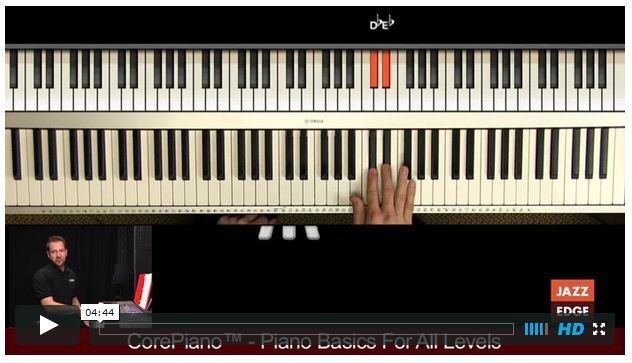
My 7 year old and 5 year old are using this program so we are going a bit slower than recommended.  We have been taking about a week for each lesson so they can get in plenty of practice. We are still working with the first 8 lessons. I have to admit I know nothing about playing music but these videos are so easy to understand.  After the first week the girls could find the C and F keys with out any trouble at all. Snoopy can play them both forwards and backwards. I think she might be the one to get my dads musical talent. They are also learning what a high and low notes are. They are both still trying to memorize where all the notes on the piano are at. Snoopy seems to be having an easier time memorizing than hotrod princess is. Snoopy says she likes that it is easy to understand, and she can pause the lesson any time and try out what he has been talking about. Hear is a picture of what you would see with one of the lessons. I like that the keyboard is bigger than the instructor. It makes it easier to see what his hands are doing.  I do wish the video lesson gave a home work assignment for the week. Its written under the video lesson but my kids never seem to see that part.  It would be great if at the end of the lesson he gave a clear you need to practice _________. Then may be give a quick demo of what all to practice for the week. I think it would really help smaller kids better understand what they should be practicing for the week.

JazzEdge  Review
The program comes with downloadable sheet music. Downloading is simple, you just click the link on the right hand side of your main dash board. It is clearly labeled and easy to spot. We have only used one piece of the downloadable sheet music so far. I have printed them off and made her a cute little music book. Looking through the pages the music looks fairly simple. Each page is marked on the top right hand side with the lesson that the music sheets go with. This will make it simple for my 7 year old to be able to find the music that goes with the lesson she is working on.  The music is printed in a larger size so its easier for younger kids to see.

This is a short video clip of hotrod princess showing her PoP what she had learned this week.


The girls have really enjoyed the program so far and it is well worth the price. The girls are picking it up fast enough that they are encouraged to keep going with the lessons and that makes me one HAPPY Momma. Click the link below to see what some of the other crew members are saying about EasyPiano Basics.
 
 
JazzEdge Review
 
 
 Facebook: https://www.facebook.com/PianoWithWillie
Twitter: https://twitter.com/PianoWithWillie
Pinterest: https://www.pinterest.com/jazzedge
YouTube: https://www.youtube.com/user/JazzEDge
Vimeo: https://vimeo.com/jazzedge
 
 
Crew Disclaimer

Thursday, May 28, 2015

Summer Fun

Our school year is winding down now. We have begun our summer schedule where our official curriculum has been mostly completed. We begin to focus on any weaknesses we may have before the new year starts. We will have from now tell July 1 to brush up on anything that needs reviewing. We are doing something a little different this summer. The girls have the opportunity to participate in a local summer day camp.  They will learn horse back riding, swimming lessons, art lessons, obstacle course, archery and team building skills etc.  Camp is giving them the opportunity to get out and try some new things they have never done before and a chance to make some new friends. They are both looking forward to the horseback riding lessons the most. I am excited that they will get some much needed swimming lessons. We spend a lot of time splashing at the river and visiting the water park. We have been working on some basic swimming skills. But they will really benefit from some actual lessons.

End of the school year also means its time for mom to get curriculum prepared for the new year. This year I have done quite well getting curriculum before hand. I still have two subjects to order for the new year. I have gone back and forth trying to decide on what I would like to do for history and science. But at last I have finally decided and I think the girls will both be happy with the choice. Now I just need to get it ordered so I have some time to get the year planned before the new year starts. Planning the year is my least favorite task of homeschooling. I tend to get overwhelming trying to plan out an entire year of learning in just a week or two. How ever it must be done and I am determined to be a little more organized this year.

Wednesday, May 20, 2015

Camping FUN

Me and the girls spent the last 4 days in camping bliss. We did not do primitive camping this time. We went to the camp ground at the lake. It rained cats and dogs for two days of the trip but we had an amazing adventure. We hiked in the rain we biked in the rain we discovered ,that the slide at the play ground turns into a slip and slide when it rains a lot. The girls played in the mud so much I don't think their clothes will ever come clean. We squeezed in 3 science experiments, and we crashed a public schools field trip to the dam on accident but the park rangers didn't seem to mind that we were listening in.  We put up the movie projector under the awning and watched Big hero 6 in the rain. I think we had a few other camper watching from the windows of there camping trailers and kids kept riding by on their bikes to watch the movie. We ate way to many Smores and probably too many snacks.
I thought I would share a couple pictures from the trip it rained so much I didn't get a chance to have my camera out all that much. There is a picture of our camp fire I included this picture just for my brother in law incase he reads this post. He had tried t build a camp fire so we could make dinner. After a failed attempt or two or three the moms had to take control or we were never going to eat. If you ask Snoopy Girl she will tell you that all you need to build a fire is: wood, a mommy, two paper plates, and a lighter.  As you can tell from the other picture the lake was nice and full. They even had to let out more water while we were there. The opening of gates sounds like thunder incase you have never had the chance to experience it. Even with all the rain we still had a blast and we cant wait to do it again. I think me and the girls could spend the hole summer as camp host.


Monday, May 4, 2015

Camping Trip

Summer is well on its way here. Me and the girls are planning a camping trip some time in the future though we still have not pined down a date yet.. This is one of the girls favorite summer time activities, and we try to make it as often as possible. Some times its just me and the girls, some time all the cousins and grand parents come. This trip some of the cousins will be coming.  We try to do something new and fun on each trip. This year we have gotten an out door movie screen and projector. The kids don't know it yet but they will be having an out door movie complete with popcorn and snacks. I cant wait to see their reactions when they finally figure out what the surprise is! So what's one of your families favorite summer time activities? How do you like to make your summer FUN!

Friday, May 1, 2015

A+ Interactive Math Family Math Package Review

A+ Interactive Math Review

Me and the girls have been reviewing A+ Interactive Math you can find the main website here http://www.APlusTutorSoft.com. We are using the Family Math Package which you can get to here http://www.aplustutorsoft.com/ViewInteractiveMathFamily.jsp.

The Family Package is so flexible its crazy. It was designed so that you buy a package for the number of children you need it for. They have packages available for a single child all the way up to 10 children. I do believe if you have more than 10 children you can contact them to request a bigger family package. It starts at first grade and goes through algebra 1. Each student can move between grade levels as needed. Hears an example. Say you have three kids you would buy the 3 student-family package, a yearly subscription sells for $249.99. You then enroll all three of your children and select what grade level they are in. They would each have their own user name and password. Now say you realize that your second grader is struggling with subtraction. You can simply switch her to first grade for a few weeks and allow her to review first grade subtraction. Once she is doing well you simply change her back to the second grade level.

A+ Interactive Math Review
This math program offers so many features I would have a really long list if I posted them all for you. So I am going to list my favorite features and why:
  • Recommended lesson plans. These make my week run smoother its one less thing I have to plan. The lesson plan is all done for me and I can print it out for my binder.
  • Instant online grading. Who doesn't love something that grades its self its just a nice time saver on the days when I have a lot going on.
  • Progress reports allow me to see how they are doing and make logging our days work faster.
  • The ability to print work sheets and test. While I like computer based learning, I still believe that a child needs to be able to do the work on paper.
  • A+ Interactive Math Courses meet or exceed state and national guidelines. This is simply good information to know about any program you are using.
  • Real time feedback on the practice problems. If they get it wrong it tells them right away. Then the program shows them how to get the correct answer. This feature helps the girls so much.
  • Templates to create additional worksheets and test. This feature is much easier to use than I anticipated. It is great if you have kids that love work pages. We use these when we are on the go. 
  • Full printable curriculum E book. We often go camping for a few weeks at a time. The Printable E books allow me to print and take all or some of the book with us.
Both of the girls have really been enjoying A+ interactive. Some days they do 3 or 4 lessons or worksheets. Both girls can log in to the program by them selves. Hotrod girl can navigate most of the site on her own. Where as Snoopy still needs some help getting started. She also needs help when she does the worksheets online. There are several buttons along the top and it seems to be a little confusing for her.  Snoopy really likes the multimedia lessons the best. She will choose these over worksheets most of the time. The multimedia lessons explains how to do the problems, then give you some practice problems. If you get a practice problem wrong it tells you right away. Then it shows you how to get the correct answer, and gives you a chance to try again. It gives you a score and you can retake the lessons more than once. Some times the girls need to hear the instructions more than once for it to stick.

Hotrod girl is in second grade. She has worked her way through the multimedia lessons, for both
multiplication and division. These are two areas she has been needing help with so we focused on them the most. She has now begun to work on the worksheets and quizzes. After I showed her how to do it. She can access both of these items on her own with out trouble.  She prefers to work independently most of the time.  You have the option to do the worksheets and test online and have them auto graded. Or you can print and grade them your self. If you choose to print and grade them, you can still enter the grades into the program. We print the work pages for when we are away from the home. But the girls ask to do the test online. My only issue with doing the online test is that I can print a report which gives the test they took and the grade they got and the date it was taken. But so far I have not found a way to print a copy of the actual test that they took. I try to keep a copy of all the test the girls take for the end of the year portfolio.
 
Both of the girls have really enjoyed A+ Interactive Math Family Math Package. I am in love with their improved attitudes about math practice and learning new concepts. To see what others on the Crew are saying about A+ Interactive Math Click the banner below.
 
Social Media:Facebook: https://www.facebook.com/APlusTutorSoft
Twitter: https://twitter.com/aplustutorsoft
Pinterest: http://www.pinterest.com/aplustutorsoft

A+ Interactive Math Review
 
 
/
Crew Disclaimer