Are you are in the market for a online homeschool planner/tracking program? I have a great product that I want to share with you. It comes from the Homeschool Buyers Co-op ~ http://www.homeschoolbuyersco-op.org/ and its called Homeschool Planet. I think this program does everything but the dishes. It is a online program, at the time of this post you can buy either a yearly or monthly subscription. Monthly it goes for $6.95 or you can go for the yearly subscription for $65.00. I received the yearly subscription for this review. Homeschool Planet offers a truck load of features. Well not really a truck load but it does offer a lot of great features. Hear is a quick over view of what the program does. First off are the feature for running a house: To Do List and Shopping List that you can text or email. Calendar sharing, widgets to do research or send text messages. There is also a mobile version so you can access things on the go. Then you have the Homeschool Features: Lesson plans, attendance tracking, a planner, a calendar, separate logins for each child to log in view and check off their assignments, a daily digest, email and text message reminders. There is also tracking for attendance, grades, and time spent, and transcripts. You can even print off reports for just about anything you would need a report for while home schooling.
Since Homeschool Planet offers so many great features I decided I would talk most about the features that have been most useful for me and the girls.
We just started our new school year. I was a little worried about setting up a new school year and learning a new program. It took a month to get the hang of my old program. Turns out I was worried about nothing. Getting started was easy peasy. I signed up for the Homeschool buyers co-op. The Co-op is free to sign up for. Once I had a log in, I then signed up for my copy of Homeschool Planet. I think it took me all of 15min to do. From there I logged into my Homeschool Planet account. You will find some simple to follow tutorial videos under the help button located at the top right of the screen. You click the help button then select online help. It opens a page where you can access how to articles and tutorial videos. I do recommend that you watch the videos. They give you a quick easy to understand way to get set up and going with the program. How ever Homeschool Planet is easy enough to operate that you can figure most of the program out on your own. I had my school year set up in about 20 minutes. You find the school year & vacation set up under the settings button on the top right. It allows you to put in your start and finish dates, vacation days/holidays. From that same screen you can select different tabs. You can set subjects, grading, if you want the program to track time on classes or assignments. You can set if you want Homeschool Planet to share your calendar with google calendar and vice versa. You can input the information about your school like name, location, phone number etc. You can even change the back ground theme of Homeschool Planet. The girls chose a horse them.
 Once I had all the general stuff set up subjects vacation days, start and end dates I moved on to adding students. You do this on the left side of the page. There is an add a person button. You can actually add in other people beside students if you plan on them needing the schedule or if you want to have Homeschool Planet email them reports etc. Since its just me and the girls, my page shows Mom, HotRod girl, and Snoopy. You can customize each profile with a cute little picture of the person or what ever you want. You can put in email address and phone number so that they can be sent the digest and reminders by email or text. Neither of my girls have email or cell phones yet so this is a feature we don't use but I like that it is an option for when they get older. You can also select if you wish for attendance to be tracked for each person. We don't use this feature yet, but you can provide each person with an individual login password. The program also allows you to restrict what they have access to and what they are allowed to make changes to.

Under each person you can input the classes and assignments they need to do. It only takes a couple clicks to get it done. You can even list birthdays holidays and appointments, chores etc. for each individual person. We only use the class and assignment features at the moments. I like to pre schedule classes. I click on a time on my calendar select class. From there I can add what class I want them to do. I can set the dates for how long I want the class to run. I can set the grading scale, time spend on the class, I can give it assignments and add resources to those assignments. Once an assignment is entered you can then check off when it has been completed straight from your main calendar. If you have set up grading for each subject you can also give a grade to the assignment from the main calendar or use the grading helper. I have been setting up a weeks worth of assignments on Saturday so that I don't have to enter assignments during the week. All I have to do during the week is open the calendar and mark off if an assignment has been completed. I can also award a grade if necessary. If you set up access for your child they can check off completed assignments them selves. This is something the girls will be doing in the future.
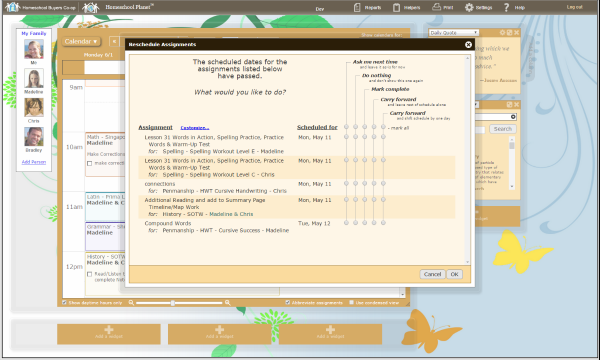 You can find a grading helper and a rescheduling helper at the top under a tab called helpers. The grading helper is self explanatory it gives you the assignments for the day and allows you to give a grade for each assignment all in one place. I don't use the rescheduling helper much but its fairly simple. When you open it you are given a few choices. You select which one fits best what you need to do. Reschedule an over due assignment, reschedule over due assignment and todays assignments or reschedule assignments by making it a day off. Once you have selected an option it then gives you a quick choice on where you want the assignment to go. From the main calendar you can drag a class to another day if you need to move one class quickly.
Resources are also a an important part of home schooling. Homeschool Planet offers a resource section. This is where you can input all the resources that you plan to use for the year. You can put them in by workbook, book, website, DVD, Cd, article, file from computer etc. You can also select which subject you would like the resource to be under. The best part is the ISBN lookup feature. You simply select book, workbook, or textbook enter the ISBN number and hit look up. It will then search for the book and enter the known information for you. It saves some time and keeps me from having to enter it all manually.
You can find a grading helper and a rescheduling helper at the top under a tab called helpers. The grading helper is self explanatory it gives you the assignments for the day and allows you to give a grade for each assignment all in one place. I don't use the rescheduling helper much but its fairly simple. When you open it you are given a few choices. You select which one fits best what you need to do. Reschedule an over due assignment, reschedule over due assignment and todays assignments or reschedule assignments by making it a day off. Once you have selected an option it then gives you a quick choice on where you want the assignment to go. From the main calendar you can drag a class to another day if you need to move one class quickly.
Resources are also a an important part of home schooling. Homeschool Planet offers a resource section. This is where you can input all the resources that you plan to use for the year. You can put them in by workbook, book, website, DVD, Cd, article, file from computer etc. You can also select which subject you would like the resource to be under. The best part is the ISBN lookup feature. You simply select book, workbook, or textbook enter the ISBN number and hit look up. It will then search for the book and enter the known information for you. It saves some time and keeps me from having to enter it all manually.
 So far Homeschool Planet is running smoothly. I had one small glitch with internet explorer but technical support was wonderful and got the issue fixed right away. The only thing I feel the program is missing is a reading log. My girls read a lot of library books for free reading. I need to keep track of these books. How ever I do not want to have to enter them each as an assignment and resource. I prefer my resources to just list the curriculum books and websites that we are using for our core classes. It would be great to have a designated reading list where the girls could enter the book ( ISBN lookup would be great) and then list how much time they spent on the book.
I am very happy with Homeschool Planet and its ease of use. I hope you will click the link below and see what other Crew members are saying about Homeschool Planet. I also wanted to mention that Homeschool Planet offers a free 30 day trial and no credit card is required so give it a try. http://www.homeschoolbuyersco-op.org/
Social Media:Facebook: https://www.facebook.com/homeschoolbuyers
Twitter: https://twitter.com/hsbuyerscoop
Google+: https://plus.google.com/112069021534542740249/about
So far Homeschool Planet is running smoothly. I had one small glitch with internet explorer but technical support was wonderful and got the issue fixed right away. The only thing I feel the program is missing is a reading log. My girls read a lot of library books for free reading. I need to keep track of these books. How ever I do not want to have to enter them each as an assignment and resource. I prefer my resources to just list the curriculum books and websites that we are using for our core classes. It would be great to have a designated reading list where the girls could enter the book ( ISBN lookup would be great) and then list how much time they spent on the book.
I am very happy with Homeschool Planet and its ease of use. I hope you will click the link below and see what other Crew members are saying about Homeschool Planet. I also wanted to mention that Homeschool Planet offers a free 30 day trial and no credit card is required so give it a try. http://www.homeschoolbuyersco-op.org/
Social Media:Facebook: https://www.facebook.com/homeschoolbuyers
Twitter: https://twitter.com/hsbuyerscoop
Google+: https://plus.google.com/112069021534542740249/about


 Once I had all the general stuff set up subjects vacation days, start and end dates I moved on to adding students. You do this on the left side of the page. There is an add a person button. You can actually add in other people beside students if you plan on them needing the schedule or if you want to have Homeschool Planet email them reports etc. Since its just me and the girls, my page shows Mom, HotRod girl, and Snoopy. You can customize each profile with a cute little picture of the person or what ever you want. You can put in email address and phone number so that they can be sent the digest and reminders by email or text. Neither of my girls have email or cell phones yet so this is a feature we don't use but I like that it is an option for when they get older. You can also select if you wish for attendance to be tracked for each person. We don't use this feature yet, but you can provide each person with an individual login password. The program also allows you to restrict what they have access to and what they are allowed to make changes to.




No comments:
Post a Comment