Showing posts with label Math. Show all posts

Thursday, February 21, 2019

IXL Learning Review


Has anyone ever tried IXL Learning? We are trying out a annual membership. This is an online supplemental curriculum. There is math and language arts for grade pre-k through 12. Then they offer 2nd through 8th grade science and 2nd through 8th grade social studies. Then they have an intro to Spanish. The amount of content covered in each subject area varies from 48 to 300+ different skills. An annual membership for the combo package is $159 for one child and you can add additional children for $40. They have a few other options in different price ranges that you can find on the website https://www.ixl.com/membership/family/pricing.

Set up is very easy. You log in create your profile and those of your children. Each of the girls has their own log in. Parent goodies: I get a weekly report in my email so I can see if they are logging in and how much they have done and how well they have been doing.  They use some handy dandy charts and graphs to display this information. It also gives me suggested lessons for each child. When I logged in I found a tab at the top that for me says MO standards. Under this tab I can find a listing of the different standards that are covered in this program. Depending on what state you put in your profile this should change to fit your needs. I love that the standards are printable. I printed them off then I highlight each one that we have covered with a lesson through IXL. I will then add these to each of there portfolio boxes at the end of the year. The analytics tab will give you loads of info on how your kids are doing. You can view there usage how many questions they have answered, how much time they have spent on the program, number of skills covered. You can also get a preview of the questions they have been working on. There is a diagnostic tab that tells you what they need to work on. A trouble spots tab that simply tells you what they are having a hard time with. Then a scores, questions, and a progress tabs.

Both of the girls have been working in IXL. I ask them to start off with the diagnostic area. This will ask them some questions then give them recommended areas that they need to work on it basically gives them a jumping off point and helps you to see what they need to work on. The diagnostics on this program is a little different from what we have done with other programs. It is called continuous diagnostics. Which basically means it never really ends this was hard for the girls because they didn't know when to stop. To start off your child should do enough to get a good picture of what they need to work on. The girls did questions tell I had a little info on what they knew for each of the subjects offered this takes some where around 120-150 questions. I did not have them do all of these questions in one sitting. I had them work on it for about 15 min at a time. The program recommends your child continue to answer 10-15 questions in the diagnostic section every week to help you see what areas they need to work on.

 I ask them both to work through the recommended lessons that the diagnostics test recommends one day a week. As they work through those lessons and answer more diagnostic questions it gives them different recommended lessons. This helps to fill any gaps that they may have. I can then compare what they have completed and done well on with the standards for our state and keep track of how they are doing over all. After they do those recommended lessons they are then allowed to work on any subject area that they want.

Snoopys favorite subject out of everything she tried is Science. She says the lessons give her good information that is easy to understand and follow. She said the questions fit the information and it doesn't ask her anything crazy that was not covered in the lesson information. She has also started working through the history section because she just finished up our primary history curriculum. She had trouble explaining to me how it worked so I logged into my parent account and did few of these sections my self just to see how it worked. It started me off with some questions if I answered wrong it gave me the correct answer and an explanation. Some times when I gave the correct answer it gave me a more in depth explanation which is great. The explanations often times came with a picture or photograph. I was please with the topics covered under history and we will definitely be doing more with it in the coming weeks.

Gabby likes the Spanish section best. She has zero experience with Spanish other than what she orders at the local Mexican restaurant. She says that as you work through it you can earn different virtual prizes likes stickers and stuff. She said she would like to see it offer something like a digital books. She tells me that the lessons offer audio so she can hear the letter and word sounds. It tells you if its right or wrong in Spanish. She is hoping she will pick up enough to be able to have short conversations with the lady that owns the local Mexican restaurant. The second subject area she worked with was  math. Math is a trouble area for her and we are always willing to try something that might help her understanding in a certain area. So far she has not learned any new methods but she was happy to see that it gave her an explanation when she got the wrong answer to something. She would like to see more instruction before beginning the problems.


Over all I am pleased with the topic offered in IXL Learning. I think its a great supplemental program that could be helpful for filling in any gaps you may be worried about in your primary curriculum. Click the link and take a look at what the other crew teams are saying about IXL.

Immersive, Adaptive Learning Online {IXL Learning Reviews}
Social Media Links:


Facebook: facebook.com/IXL
Twitter: twitter.com/IXLLearning
Pinterest: pinterest.com/IXL
YouTube: youtube.com/IXL

Crew Disclaimer

Tuesday, May 31, 2016

Essential Skills Advantage Complete Home Learning Suite Review

Essential Skills Advantage Review

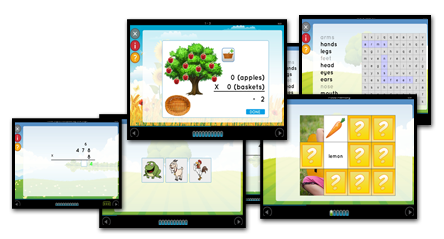
We are testing out a program known as Essential Skills Advantage . They have several options but we received the Complete Home Learning Suite for this review. This is an online supplemental program. It has lessons on different topics, math, science, language arts, reading, geography etc. Has lessons for grade levels K-6th.  How ever not all subjects are offered in all grade levels. The program is composed of 43 individual programs 998 units totaling over 14,000 interactive lessons.
Since we are at the end of our standard school year. We have been using this as our summer curriculum. Three days a week the girls do one unit a day under each subject that is available for the grade level that they are in. While this is not a complete curriculum it is a wonderful supplemental program. 
Essential Skills Advantage Review
Like I noted above this is an online program so you will need an internet connection to use this program. I felt it covers a wide range of subject areas. All though I would not call this a complete curriculum because it doesn't cover quite everything needed to meet GLE. I do give it high points for a fun supplemental program

Essential Skills Advantage Review My girls have really liked using this as there summer curriculum. My oldest has a high opinion of the spelling section. It gives her things like word searches instead of just typing or writing the words over and over, and I think that's what draws her to it. I have actually seen an improvement in her spelling and her understanding of what the words mean. 
They have both enjoyed the science units we have tried. We used two of them to go along with what we had just finished up in our regular curriculum. We started with one on the solar system. It was great for filling gaps and brushing up on the topic before we took the end of year test. It covered some things like phases of the moon that our other curriculum did not cover. It really rounded things out well. The girls wanted me to mention that the graphics were great and the activities or experiments were FUN even though they were on a computer.

My little one is my math nut she said the lessons were fun and she didn't mind doing them. She felt they were explained well and frequently ask to do ESA math over a paper workbook. She had no real issues with it and seemed to glide on through each unit. My 3rd grader was a little frustrated at times but we seemed to be able to work though it after I played with the math lessons my self to see how they worked. Her least favorite part was the riddles, but she doesn't like riddles any way so that was no surprise.

Grammar was also an area that my 3rd grader spent some time on. She took to it quite well, She liked the bite sized lessons. She said the smaller shorter lessons made it less over whelming to do. That's a bonus in my book. Grammar can be so over whelming for younger kids. This is broke down about as simple as it can get. 

We hit up the reading section last week. So we haven't been using it all that long and we have only used the story time section. But I like what I see and what I am hearing from the girls. Story time gives a short story then some questions about the story after. The questions all fit the story and the stories are entertaining enough that the girls are not complaining about having to read them. I did find a few things in the first grade reading that I felt were a little below first grade. But you can easily skip over them or just do them quickly as a review. Every child reads at a different level so may be its just my child. 

 I was a little disappointed that all the subjects are not offered for each grade level. But that was my only disappointment and I was only disappointed because we like it so well I want my little one to be able to do all the subjects. 

Click the banner below and read the other crew reviews. 

Social Media Links:

Facebook: https://www.facebook.com/skillsadvantage/
Twitter: https://twitter.com/SkillsAdvantage @SkillsAdvantage
Pinterest: https://www.pinterest.com/SkillsAdvantage
Google +: https://plus.google.com/u/0/
LinkedIn: https://www.linkedin.com/company/skillsadvantage
Blog: http://buyesa.com/blog/
Essential Skills Advantage Review
Crew Disclaimer

Tuesday, March 15, 2016

Demme Learning's Math-U-See Review

Demme Learning Math U See Review
It's that time of year where we all start looking for great math programs. This time we are trying out Demme Learning AKA Math-U-See. We will be using the Gamma level books as well as the Digital Packs. Since we are using the Gamma level books we are also using the Digital Pack for the Gamma level. The goal of the Math-U-See programs is to help produce students that are confident problem solvers that enjoy doing math.
Demme Learning Math U See Review
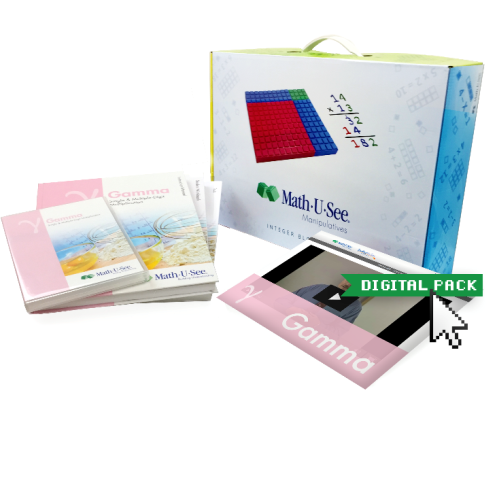
This was our first try at a Math-U-See program. We went with the Gamma level because my oldest struggles with memorizing her multiplication tables. I gave her the online assessment and it suggest starting with Gamma. We used Math-U-See Gamma as a supplement 3 days a week. Demme Learning really blessed out family with the box they sent us. We received the student work book, the test book and instructional manual and instructional DVD as well as the digital pack for 12 months. We also received the Integer Block Kit which has 133-pieces.

The student work book has work pages that helps to reinforce the lessons, that are taught on the instructional DVD or the Digital pack. Each lesson has multiple pages. How ever we found that for some lessons she didn't need to use all of them. Like when she practiced her 1's and 0's she got those memorized quickly and didn't need the extra practice. But when she got to the 3's she used all the work pages and got in extra practice. Great workbook its easy to follow and she doesn't have trouble finding the work pages for the lesson she is working on. I am loving that the workbook had review areas where it refreshes what was learned in earlier levels.

The test book is, well self explanatory its a book with all the test for the Gamma level in it. I like the separate test book because I can toss it in the portfolio box  and its all together. Then I can easily select random workbook pages to be put in the portfolio box.

The Instruction Manual is handy it helps you teach the program as well as giving you the solutions to the test and work pages. I like having the solutions because lets face it math is not my strong point. I found teaching from the instruction manual to be simple enough. It makes the lessons easy to explain everything is in order and it provides examples and explanations to help you teach it.


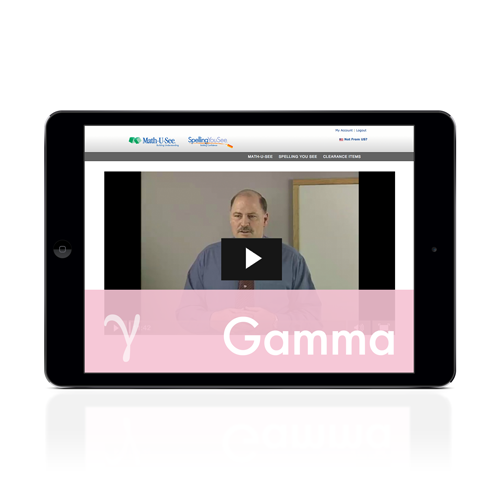
The best part is if your having trouble explaining the lessons you can always defer to the Video Lessons. I am told the videos are more for the teacher to watch to see how to teach the lesson. But for my daughter the Video lessons make the program. She much prefers to hear the lesson and see a demonstration from the Videos. We love how he explains each lesson, he covers everything thoroughly. He is quick and to the point and that is important to my non math loving daughter. She can watch the lesson over and over if she needs to. We can watch the DVD or we can use the Digital Pack.

The digital pack is something new from Demme Learning. The digital packs include 12-month access to the level you choose in our case Gamma. It has streaming instructional videos and a PDF instruction manual which has lesson and test solutions, skip counting songs on MP3,a PDF songbook. The digital pack also includes Digital Manipulatives but you need to use Chrome or Safari. It does not include the student work book or test book. The digital manipulatives are basically the Integer Blocks but on the computer screen. You can move them around and manipulate them like you would the physical blocks. We use these when we have to do math on the go. Another bonus to the digital pack is the work sheet generator and online drill. The work sheet generator is great for making extra practice pages. You can make more work sheets for any of the lessons covered in the level you purchased. Online drill is exactly that, a way to drill facts with out having to have physical flash cards. You can drill for addition, subtraction, multiplication, or division. Then there are some selections you can make under each one. 


Demme Learning Math U See Review

We finished our main math curriculum several weeks a go. So we have been using Math-U-See Gamma 3-4 days a week, to go back and try to master Multiplication tables. Along with the student workbook and video lessons, my daughter is using the online drill at least one day a week now. Its not her favorite thing to do but she likes it better than standard flash cards. We have used lots of pages from the work sheet generator. We have been using them to review addition and subtraction and simple division as well as multiplication. It great to be able to brush up on the things we covered earlier in the year. 

Other crew members have reviewed different levels of Math-U-See and I would love for you to click the banner and see what they have to say.


Demme Learning's Math-U-See Review


Twitter: https://twitter.com/mathusee  @mathusee #​mathusee #homeschoolmath​ #hsreview


Crew Disclaimer

Wednesday, May 15, 2013

Speed


I have been trying to teach the Hotrod Princess how to skip count for a couple months now. This seems to be something that she is having a hard time understanding. I have been looking for different ways to help her get the hang of skip counting and I have finally found a fun game that seems to work. Its called "SPEED". its made by highhill educational supplies and you can find it on amazon for about $18.99. You can click HEAR to find it.  "Speed" is  a fun card game that teaches kids to multiply and how to multiply faster. It even helps teach skip counting. Once kids are familiar with the numbers in a game, multiplication gets easier. The game consist of eight decks of cards 2's - 9's in which kids learn skip counting. Its a two player game where players play against each other to see who can get rid of all of their cards first. "Speed" is a great hands on multisensory game that is short and quick. Its perfect for kids that have short attention spans. The repetition of the game helps kids with memorization. Its great for all learning styles.

one of our games 
We have been playing "Speed" for a few weeks now and I can already tell that it is helping the Hotrod princess with her skip counting. We are still working with the 2's right now. I went over the directions a couple times to be sure I understood how to play the game and what the rules were. I explained it to the Hotrod princess and then showed her what we had to do. She picked up how to play the game very quickly.  Over the last few weeks she has gotten faster at playing "speed".  She now makes less mistakes when skip counting by 2's. I can only see things improving from hear as we advance through the game. I think my skip counting is even getting better. I have noticed that I am getting faster at figuring out what cards I can play next.  We have so much fun playing "SPEED" that she often chooses "Speed" over many of our other games. Its a very fast game so we can usually squeeze in a game or two while we are waiting for it to be time to go some place. It has become a great rainy day activity that we really enjoy . I cant wait for Snoopy to start skip counting so they can play together. She is already sitting with us when we play.

I wanted to see how my sisters son who is autistic would like the game. They came up this weekend and we played a few rounds. He did very well with it and seemed to enjoy playing the game with us. It was easy for him to understand how to play and I think it will help him get better with his multiplying skills. He learns best with hands on activities and "SPEED is very hands on. It's a fast game so his hands are constantly moving. This is very good for his need to fidget,  it keeps him moving and doing quickly which also helps with concentrate.

Their is also a "SPEED" app for the I Pad the light version is free and the full version is 99 cents. You can click hear to read some more about it hear on her blog.
You can also check it out on facebook

All in all "SPEED" is a great educational game that I am more than happy to have in my house. Its worth every penny.


Disclosure: I received this product at no cost for review. All opinions are my own or what my kids thought of the product.